
of eligible organizations visited the automation center.
Case study 2
Defender for Cloud automation center
Improving organizations efficiency and security governance by supporting the creation of safe automations while keeping humans in the loop
TL;DR
The project in 30 seconds
The existing automation platform was outdated and required admins to define automation rules manually, without any guidance.
I initiated a smart automation UX vision that identifies opportunities based on organizational patterns, simulates how proposed rules would perform to help anticipate outcomes and prevent errors, and provides a feedback loop for fine-tuning existing rules.
The product
Microsoft Defender for Cloud
Microsoft Defender for Cloud is Microsoft's cloud-native application protection platform (CNAPP), designed to help organizations secure Azure, AWS, and Google Cloud environments from development through runtime. Its core offerings include Cloud Security Posture Management (CSPM), Cloud Workload Protection (CWP), DevOps security, and AI workload protection, all delivered through a unified security experience.
It is one of Microsoft's fastest-growing businesses, serving more than 1.5 million security customers across the broader Microsoft Security portfolio
Context
Project incentive
Automation plays a crucial role in security. It helps teams work efficiently, improve policy compliance, and focus on critical security issues by automating repetitive tasks.
It also introduces consistency across the organization: similar issues can be handled using the same approach, with less reliance on specific stakeholders who hold unique knowledge.
Defender for Cloud had an existing automation center, but creating rules required administrators to identify opportunities and manually define the conditions and actions. The experience offered limited help in understanding what could be automated or evaluating whether a rule would work as intended.
Telemetry showed low usage and task completion rates:
of users who started creating a rule completed the process.
average Single Ease Question
These numbers showed that the experience was underused. They did not explain why. I needed to understand whether the main barriers were complexity, difficulty identifying useful automations, uncertainty about their impact, or a combination of these factors.
ASK
The opportunity I explored
The product team asked us to deliver a proof of concept for a new automation center. The goal was to increase automation adoption and, through that, improve security teams’ efficiency and time to remediation.
I expanded the exploration beyond the rule-creation experience to consider the full lifecycle of an automation: how teams discover an opportunity, decide whether to automate it, and improve the rule after it starts running.
The opportunity was to help organizations turn repeated security decisions into reusable rules, while giving people the information and control they needed to use those rules responsibly.
The automation center already existed. The new concept was a system that could suggest rules based on observed behavior and help administrators refine them using feedback from the people handling security issues.
Understanding the current pain points
Identifying what to automate required effort.
Administrators had to recognize recurring work and translate it into rule conditions and actions. I saw an opportunity to help them start from patterns already present in the organization’s activity.
The consequences of a rule were difficult to judge before activation.
A rule could affect many workloads, but administrators needed a clearer way to understand its reach and assess whether its conditions were too broad.
Creating a rule was only the beginning.
Administrators also needed to understand how rules performed, where practitioners disagreed with them, and which conditions needed adjustment.
How the features worked
Existing automation experience
framing
How shall we increase automation while maintaing human control
Automation’s value also creates its risk. A wrong rule can apply the wrong action across many workloads, potentially without someone noticing immediately.
There is also a risk that people become less aware of what the system is doing as they become less involved. When an exception requires manual intervention, they may lack the context needed to respond effectively.
This changed how I framed the problem:

How do we help security teams automate more of the right work, understand its impact, and keep enough control to recognize and handle exceptions?
Personas
Who actually does the work
To understand who these flows actually served, I mapped the personas involved and their jobs to be done.
Two emerged, with distinctly different characteristics and goals:

Security admin
“I want to improve my team's efficiency and boost policy compliance across the org.”
Owns onboarding, policies and security best practices.
Wants to maximize the security team’s efficiency and raise security compliance across the org
Use cases
- As a user I want to understand what can be automated vs what should be manually handled
- I want to create automation rules that are safe by design
- I want to track running automations, see their results, get feedbacks and ensure
- I want to understand if there are any conflicting automation rules or shadowed automations that do not take any affect
- I want to understand the potential reach of automation rules
Characteristics
- Can handle complexity well
- Focus on accuracy and quality rather than efficiency and quantity
- High stakes - his actions have huge impact across the org
- Medium to low usage frequency (several times a week) - manages automation mainly at early phases of onboarding and then periodically tracks

SecOps practitioner
“I want to focus on the subset of critical, complex issues that need investigation.”
Triages the issue queue - prioritises and decides the action: auto-fix, assign or dismiss. Overloaded with trivial issues that could ideally be automated away.
Use cases
- I want to minimize my workload either by letting automation handle trivial issues for me (full automation) or by automation suggested actions I only need to approve (semi automation)
- I want to support the admin in fine tuning automation rules so that in the long term those rules can be fully automated
- I want to focus on the most important and complex issues leaving trivial issues aside
Characteristics
- Focus on efficiency and quantity. Doesn't have too much time to invest per issue
- Low/medium stakes - his actions usually have local impact but can also operate in bulk
- High usage frequency - operates the issues queue on a daily basis.
- Needs an experience supporting efficiency while maintaining accuracy
Guiding principals
Three guiding principals guided the solution
01/ Make automation opportunities clear

Give the team a clear view of current automation coverage and an estimate of how much more could be automated.
Suggest rules based on observed behavior across the organization: similar conditions repeatedly leading to similar actions.
The suggestion should explain why it exists, which activity supports it, and where it would apply. Repeated behavior is a starting point for review, not proof that the same action is always appropriate.
02/ Help users understand the impact before activating a rule

During rule creation, show the rule’s reach: which issues and workloads match its conditions and what action it would take.
Help administrators assess risk based on the action, the affected workloads, and whether the change can be reversed.
Let them preview the rule, adjust its conditions, and choose whether actions should run automatically or require approval.
03/ Use feedback to improve existing rules

In approval-required mode, the system suggests an action during triage instead of executing it. The practitioner can accept or reject the proposal.
Their decisions feed back to the administrator, who can investigate recurring exceptions and refine the rule.
A rejection should prompt investigation. It does not necessarily mean the rule is wrong: the issue might involve timing, ownership, or an operational constraint.
the proposed workflow
Creating a feedback loop between the two personas
The experience connects the administrator’s work with the practitioner’s daily decisions. This creates a way to increase automation gradually, using operational feedback to guide each decision.

solution walkthrough
Security admin’s perspective
Understand current coverage and identify opportunities
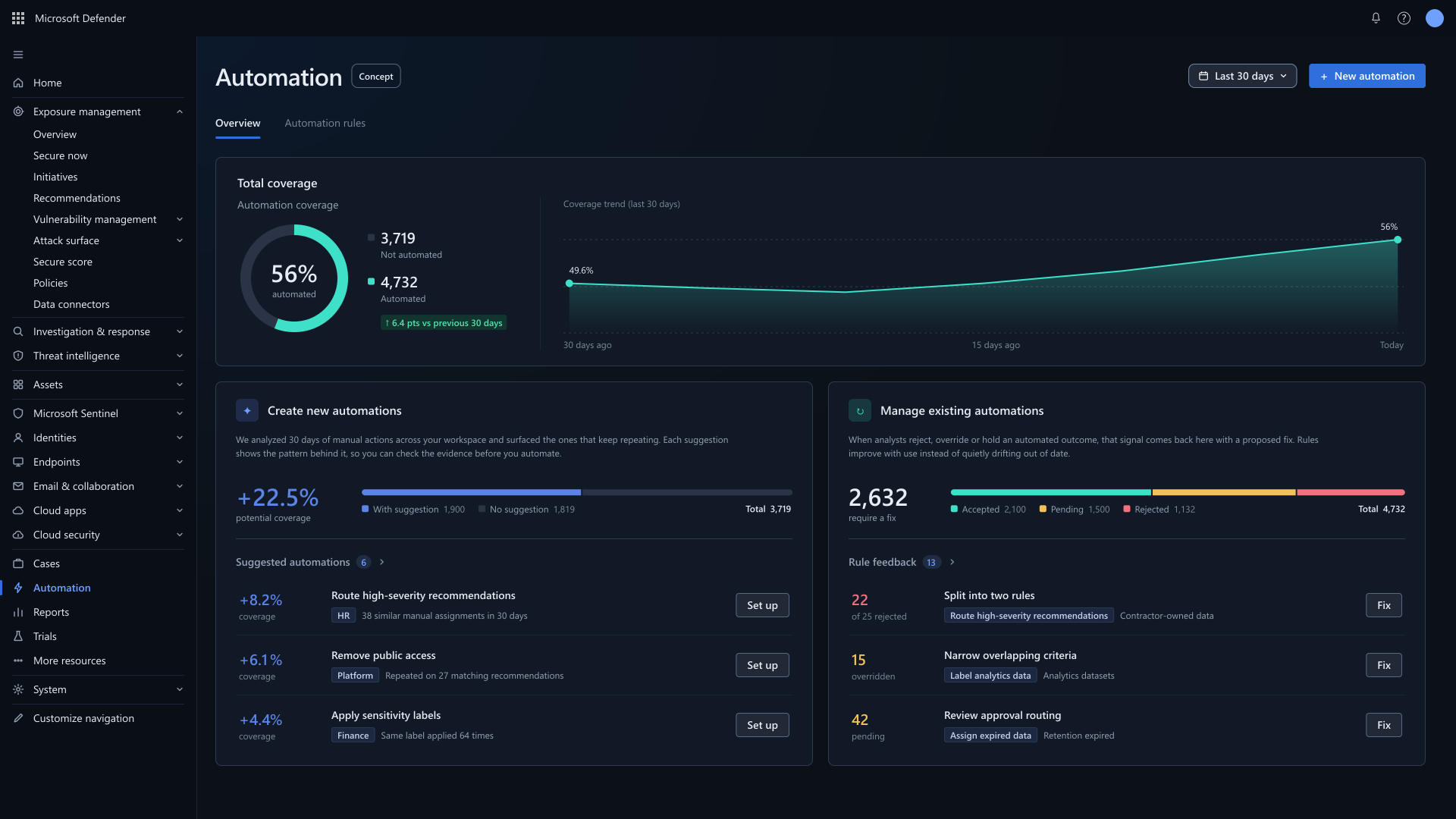
The dashboard supports three main tasks using three corresponding functional areas:
Total coverage - Understand current automation coverage and its trend.
Create new automations - Grow coverage by reviewing suggested automations. Suggestions are sorted by potential gain and provide evidence supporting the suggestion to raise trust.
Manage existing automations - Manage existing rules using feedback from their results. This highlights the feedback loop and helps the admin fine tune the automation rules based on real life feedback.
Act on an automation suggestion
Once the user clicks Set up on a suggestion - the rule creation wizard is triggered pre-populated with all suggested parameters.
The main panel contains the actual rule builder where the automation’s conditions are set.
The right pane provides a dynamic summery with an anticipated blast radius and potential risk that might be caused by the rule.
The user can review the rule’s parameters before proceeding to the next phase.
Simulation
As a safeguard and in order to build trust - the system simulates the rule’s potential blast radius, giving the user an opportunity to anticipate the automation consequences before approving the creation.
Simulation review & rule creation mode
The preview answers practical questions:
Which workloads are included?
What action would the rule propose?
Are there cases that should be excluded?
Does another rule already handle part of this scope?
The administrator can then refine the conditions and activate the rule in either automatic or approval-required mode.
Automation rules view
The automation rules tab shows the raw automation rules - each with a distribution of its related recommendations.
Specific rule view
Each recommendation consists of an overview tab and related recommendations tab.
Related recommendations tab
The admin can identify per rule which recommendations matched the rule’s criteria and were affected and automated by the rule.
solution walkthrough
SecOps practitioner perspective
Security recommendations queue
The SecOps practitioner main working view is the recommendations view. This is where he does most of his work.
Once a recommendation matches a rule - one of two things happen:
If the rule is defined as fully automated - the recommendation would be automated and the practitioner will not need to address it. This already substantially reduces the practitioner’s workload.
In case the rule is defined as semi-automated - the recommendation would be marked as Pending approval and a suggested action would be highlighted once the recommendation will be opened.
Recommendation view
Once opening the recommendation - the user can see that an automation action suggestion exists.
Take action panel
Once clicking take action - the user can see the suggested action and decide whether to accept the suggestion or select a different one.
His decision will then be reflected back to the admin as either accepted or rejected automation.
solution walkthrough
Closing the loop
Refine a rule using feedback
Suppose a rule is repeatedly rejected for contractor-owned workloads.
An overall rejection count tells the administrator that something needs attention. Showing the shared criteria helps them understand what to investigate.
The administrator can review the affected cases and decide whether to split the rule, narrow its scope, or change the action.
Take action panel
In this example, they might create a separate rule for contractor-owned workloads while keeping the original behavior for other cases.
Any change remains a deliberate administrator decision. The concept suggests a direction; it does not silently rewrite running rules.
Define success and monitor unwanted outcomes
Before testing and preview release, I would agree on success measures with product, engineering, and research.
Area01
Adoption
Share of eligible organizations with active rules that remain in use
Area02
Creation
Completion rate from starting a rule to activating it
Area03
Efficiency
Manual effort and time to remediation for comparable issues
Area04
Rule quality
Frequency and reasons for overrides, reversals, and unwanted actions
Area05
Control
Time needed to identify and pause a problematic rule